This article provides a detailed walkthrough of how to achieve full data synchronization from MySQL to PostgreSQL using Apache SeaTunnel 2.3.9. We cover the complete end-to-end process — from environment setup to production validation. Let’s dive into the MySQL-to-PostgreSQL synchronization scenario.
Version Requirements:
- MySQL: MySQL 8.3
- PostgreSQL: PostgreSQL 13.2
- Apache SeaTunnel: Apache-SeaTunnel-2.3.9
Preliminaries
Verify Version Information
Run the following SQL command to check the version:
-- Check version information
select version();
Enable Master-Slave Replication
-- View replication-related variables
show variables where variable_name in ('log_bin', 'binlog_format', 'binlog_row_image', 'gtid_mode', 'enforce_gtid_consistency');
For MySQL CDC data synchronization, SeaTunnel needs to read the MySQLbinlogand act as a slave node in the MySQL cluster.
Note: In MySQL 8.0+,binlogis enabled by default, but replication mode must be enabled manually.
-- Enable master-slave replication (execute in sequence)
-- SET GLOBAL gtid_mode=OFF;
-- SET GLOBAL enforce_gtid_consistency=OFF;
SET GLOBAL gtid_mode=OFF_PERMISSIVE;
SET GLOBAL gtid_mode=ON_PERMISSIVE;
SET GLOBAL enforce_gtid_consistency=ON;
SET GLOBAL gtid_mode=ON;
Grant Necessary User Permissions
A user must haveREPLICATION SLAVEandREPLICATION CLIENTprivileges:
-- Grant privileges to the user
CREATE USER 'test'@'%' IDENTIFIED BY 'password';
GRANT SELECT, RELOAD, SHOW DATABASES, REPLICATION SLAVE, REPLICATION CLIENT ON *.* TO 'test';
FLUSH PRIVILEGES;
SeaTunnel Cluster Setup
Cluster Logging
By default, SeaTunnel logs output to a single file. For production, it’s preferable to have separate log files per job. Update the logging configuration inlog4j2.properties:
############################ log output to file #############################
# rootLogger.appenderRef.file.ref = fileAppender
# Change log output to use independent log files for each job
rootLogger.appenderRef.file.ref = routingAppender
############################ log output to file #############################
Client Configuration
For production clusters, it is recommended to install SeaTunnel under the/optdirectory and point theSEATUNNEL_HOMEenvironment variable accordingly.
If multiple versions exist, create a symbolic link to align with the server deployment directory:
# Create a symlink
ln -s /opt/apache-seatunnel-2.3.9 /opt/seatunnel
# Set environment variable
export SEATUNNEL_HOME=/opt/seatunnel
Environment Variables Configuration
For Linux servers, add the following lines to/etc/profile.d/seatunnel.sh:
echo 'export SEATUNNEL_HOME=/opt/seatunnel' >> /etc/profile.d/seatunnel.sh
echo 'export PATH=$SEATUNNEL_HOME/bin:$PATH' >> /etc/profile.d/seatunnel.sh
source /etc/profile.d/seatunnel.sh
Job Configuration
Note: The configuration below does not cover all options but illustrates common production settings.
env {
job.mode = "STREAMING"
job.name = "DEMO"
parallelism = 3
checkpoint.interval = 30000 # 30 seconds
checkpoint.timeout = 30000 # 30 seconds
job.retry.times = 3
job.retry.interval.seconds = 3 # 3 seconds
}
The first step is setting up theenvmodule, which operates in a streaming mode. Therefore, it’s essential to specify the configuration mode asSTREAMING.
Task Naming and Management
Configuring a task name is crucial for identifying and managing jobs in a production environment. Naming conventions based on database or table names can help with monitoring and administration.
Parallelism Settings
Here, we set the parallelism to3, but this value can be adjusted based on the cluster size and database performance.
Checkpoint Configuration
- Checkpoint Frequency: Set to 30 seconds. If higher precision is required, this can be reduced to 10 secondsor less.
- Checkpoint Timeout: If a checkpoint takes too long, the job is considered failed. Set to30 seconds.
- Automatic Retry: Configured to3 retries, with a retry interval of3 seconds(adjustable based on system requirements).
source {
MySQL-CDC {
base-url = "jdbc:mysql://192.168.8.101:3306/test?serverTimezone=Asia/Shanghai"
username = "test"
password = "123456"
database-names = ["test"]
# table-names = ["test.test_001","test.test_002"]
table-pattern = "test\\.test_.*" # The first dot is a literal character, requiring escaping; the second dot represents any single character.
table-names-config = [
{"table":"test.test_002","primaryKeys":["id"]}
]
startup.mode = "initial" # First sync all historical data, then incremental updates
snapshot.split.size = "8096"
snapshot.fetch.size = "1024"
server-id = "6500-8500"
connect.timeout.ms = 30000
connect.max-retries = 3
connection.pool.size = 20
exactly_once = false # In analytical scenarios, disabling exactly-once consistency allows some duplicates/losses for better performance.
schema-changes.enabled = true # Enable schema evolution to avoid frequent modifications; supports add, rename, drop operations.
}
}
Key MySQL CDC Configurations
- Time Zone Configuration: It’s recommended to specify the MySQL connection timezone to prevent discrepancies when extracting
datetimeortimestampdata. - User Credentials:
- The username and password must have replication privileges , allowing access to the bin_log logs.
- The account should be able to query all tables under the designated databases.
Database & Table Selection
Typically, each database is assigned to a separate task. Here, we specify only thetestdatabase.
Two methods can be used:
- Direct table name selection
- Regular expression-based table matching(recommended for large datasets or entire database synchronization).
Important:
When using regular expressions, both the database name and table name must be included. The.character, which separates them, must be escaped (\\.).
For example, to match tables prefixed withtest_, we use:
test\\.test_.*
- The first dot (
.) represents a literal separator, requiring escaping (\\.). - The second dot (
.) representsany single characterin regex.
Additionally, for tables without primary keys, logical primary keys can be specified manually to facilitate data synchronization.
Startup Mode
The default startup mode isinitial, which means:
- Full historical data syncfirst
- Incremental updatesafterward
Sharding & Fetching
- The default values for shard size and batch fetch size work well.
- If the server has higher performance, these values can be increased.
Server ID
- MySQL requires unique server IDs for replication nodes.
- Apache SeaTunnel must masquerade as a MySQL replica.
- If not configured, a default value is used, but manual specification is recommended to avoid conflicts.
- The server ID range must be greater than the parallelism level, or errors may occur.
Timeouts & Retries
- Connection Timeout: For large datasets, increase this value accordingly.
- Auto-Retry Interval: If handling a high volume of tables, consider extending retry intervals.
Exactly-Once Consistency
For CDC-based data synchronization,exactly-once consistency is often not required in analytical scenarios.
- Disablingit can significantly boost performance.
- However, if strict consistency is required, it can be enabled at the cost of reduced performance.
Schema Evolution
It’s highly recommended to enable schema evolution, which:
- Allows automatic table modifications (e.g., adding/removing fields)
- Reduces the need for manual job updates when the schema changes
However,downstream tasks may fail if they rely on a field that was modified.
Supported schema changes:
✔️ADD COLUMN
✔️DROP COLUMN
✔️RENAME COLUMN
✔️MODIFY COLUMN
Note: Schema evolution does not support
CREATE TABLEorDROP TABLE.
Configuring the Sink (PostgreSQL)
The sink configuration inserts data into PostgreSQL.
sink {
jdbc {
url = "jdbc:postgresql://192.168.8.101:5432/test"
driver = "org.postgresql.Driver"
user = "postgres"
password = "123456"
generate_sink_sql = true
database = "test"
table = "${database_name}.${table_name}"
schema_save_mode = "CREATE_SCHEMA_WHEN_NOT_EXIST"
data_save_mode = "APPEND_DATA"
# enable_upsert = false
}
}
Key Considerations:
JDBC Connection:
- Specify PostgreSQL driver, user, and password.
Auto SQL Generation:
- Enabling
generate_sink_sqllets SeaTunnel automatically create tables and generateINSERT,DELETE, andUPDATEstatements.
Schema Handling:
- PostgreSQL uses Database → Schema → Table, while MySQL has only Database → Table.
- Ensure the schema is correctly mapped to avoid data mismatches.
User Permissions:
- The PostgreSQL user must have table creation permissions if using auto-schema generation.
For more details, refer to the official documentation:
🔗SeaTunnel MySQL-CDC Connector Docs
Using Placeholders in Sink Configuration
Apache SeaTunnel supports placeholders, which dynamically adjust table names based on the source data.
For example:
table = "${database\_name}.${table\_name}"
- Ensures each table syncs correctly without manual specification.
- Supports concatenation and dynamic formatting.
Schema Save Mode and Data Append Strategy
Theschema_save_modeparameter plays a crucial role in database-wide synchronization. It simplifies the process by automatically creating tables in the target database, eliminating the need for manual table creation steps.
Another key configuration isAPPEND_DATA, which is particularly useful when the target database already contains previously synchronized data. This setting prevents the accidental deletion of existing records , making it a safer choice for most scenarios. However, if your use case requires a different approach, you can modify this setting according to the official documentation guidelines.
Enable Upsert for Performance Optimization
Another important parameter isenable_upsert. If you can guarantee that the source data contains no duplicate records , disabling upsert (enable_upsert = false) can significantly enhance synchronization performance . This is because, without upsert, the system does not need to check for existing records before inserting new ones.
However, if there is a possibility of duplicate records in the source data, it is strongly recommended to keep Upsert enabled (enable_upsert = true). This ensures that records are inserted or updated based on their primary key** , preventing duplication issues.
For detailed parameter explanations and further customization options , please refer to the official Apache SeaTunnel documentation.
Task Submission and Monitoring
Once your configuration file is ready, submit the job using the SeaTunnel command-line tool:
./bin/start-seatunnel.sh --config /path/to/config.yaml --async
Key Parameters:
--config: Specifies the path to your configuration file.--async: Submits the job asynchronously, allowing the command line to exit while the job continues in the background.
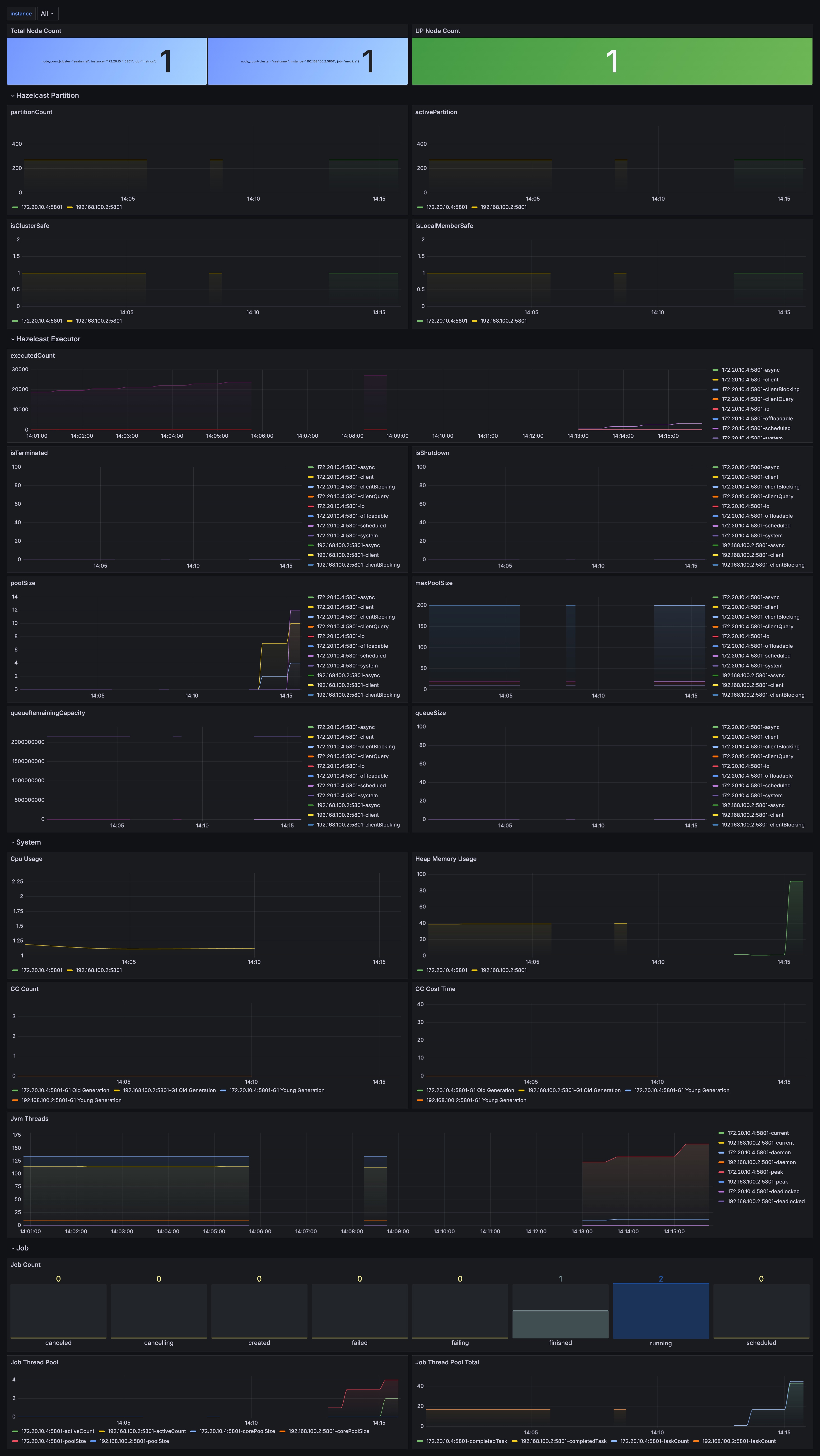
After submission, you can monitor the job via SeaTunnel’s cluster UI. In version 2.3.9, SeaTunnel provides a visual interface where you can view job logs, execution status, and data throughput details.
Data Synchronization Demonstration
For this demonstration, we created two tables (test_001andtest_002) and inserted sample data into MySQL. Using SeaTunnel's synchronization tasks, the data was successfully synchronized to PostgreSQL. The demonstration included insertions, deletions, updates, and even table schema modifications—all of which were reflected in real time on PostgreSQL.
Key Points:
- Schema Synchronization:
SeaTunnel supports automatic table schema synchronization. When the source MySQL table structure changes, the target PostgreSQL table automatically updates. - Data Consistency:
SeaTunnel ensures data consistency by accurately synchronizing all insert, delete, and update operations to the target database.
About SeaTunnel
Apache SeaTunnel focuses on data integration and synchronization, addressing common challenges such as:
- Diverse Data Sources:
Supporting hundreds of data sources, even as new ones emerge. - Complex Sync Scenarios:
Including full, incremental, CDC, real-time, and whole-database synchronizations. - High Resource Demands:
Traditional tools often require extensive computing or JDBC resources for real-time sync of many small tables. - Monitoring and Quality:
Sync processes can suffer from data loss or duplication, and effective monitoring is essential. - Complex Technology Stacks:
Multiple sync programs may be needed for different systems. - Management Challenges:
Offline and real-time sync are often developed and managed separately, increasing complexity.


picture
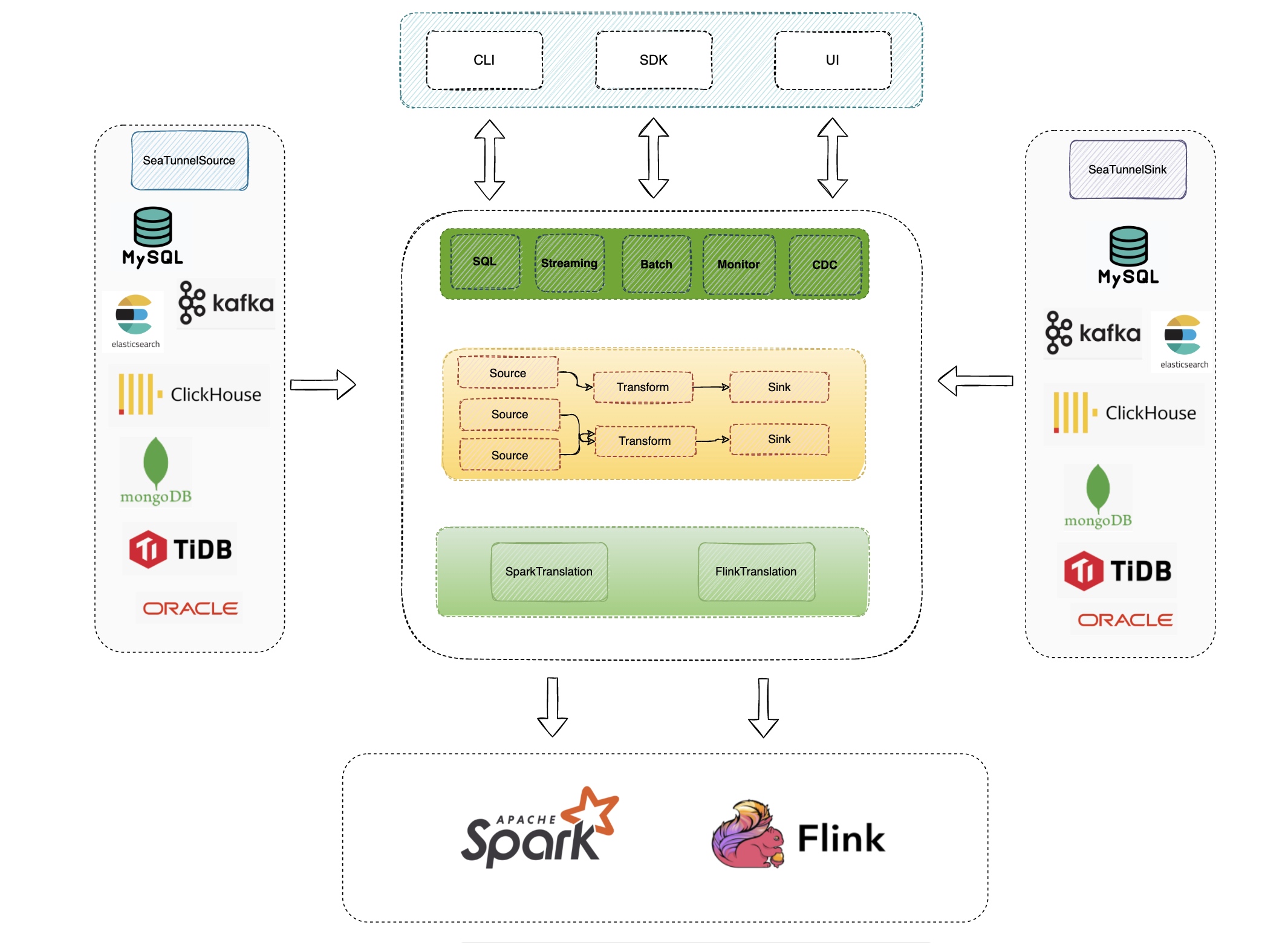
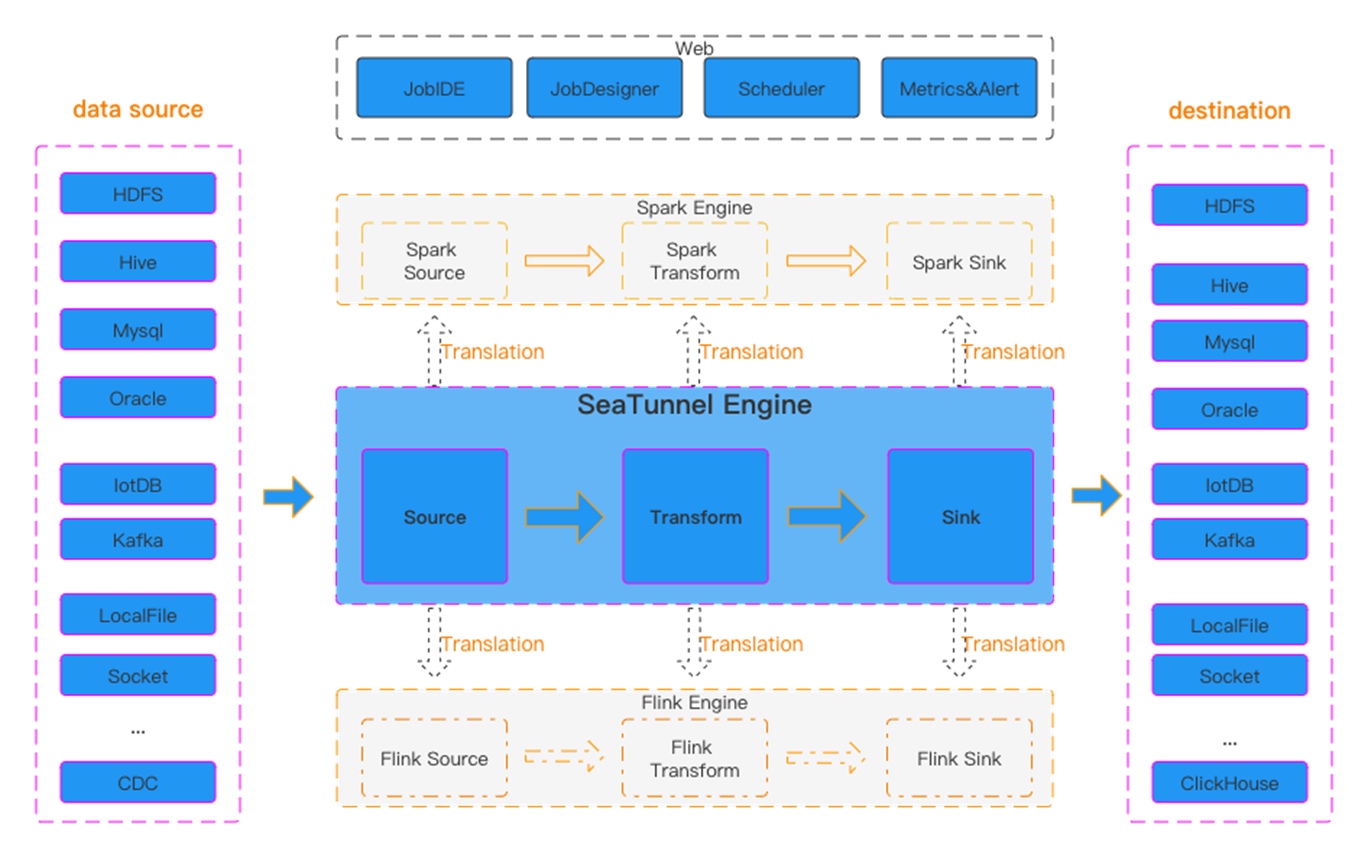
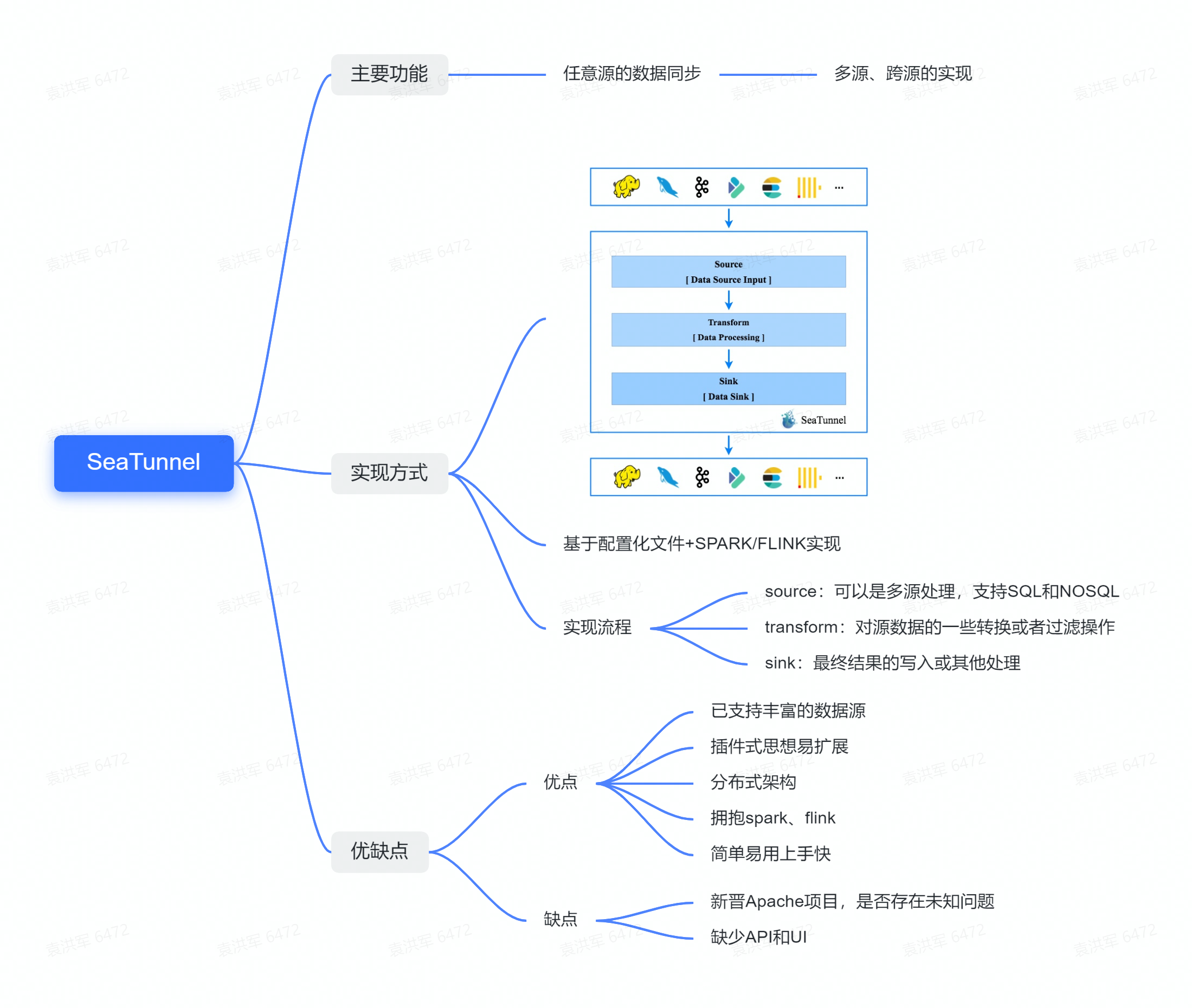
The left-hand side briefly lists the Source scenarios, for example, we abstract the Source’s API, Type, and State, to read the data source, unifying the data types of the various data sources to the abstract type defined in it, and some state recovery and retention of the read location during the reading process.
From the diagram above we see the different data sources, Source is responsible for reading data from the various data sources and transforming it into SeaTunnelRow abstraction layer and Type to form the abstraction layer, Sink is responsible for pulling data from the abstraction layer and writing it to the concrete data store to transform it into the store concrete format.
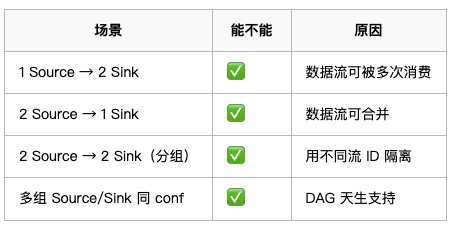
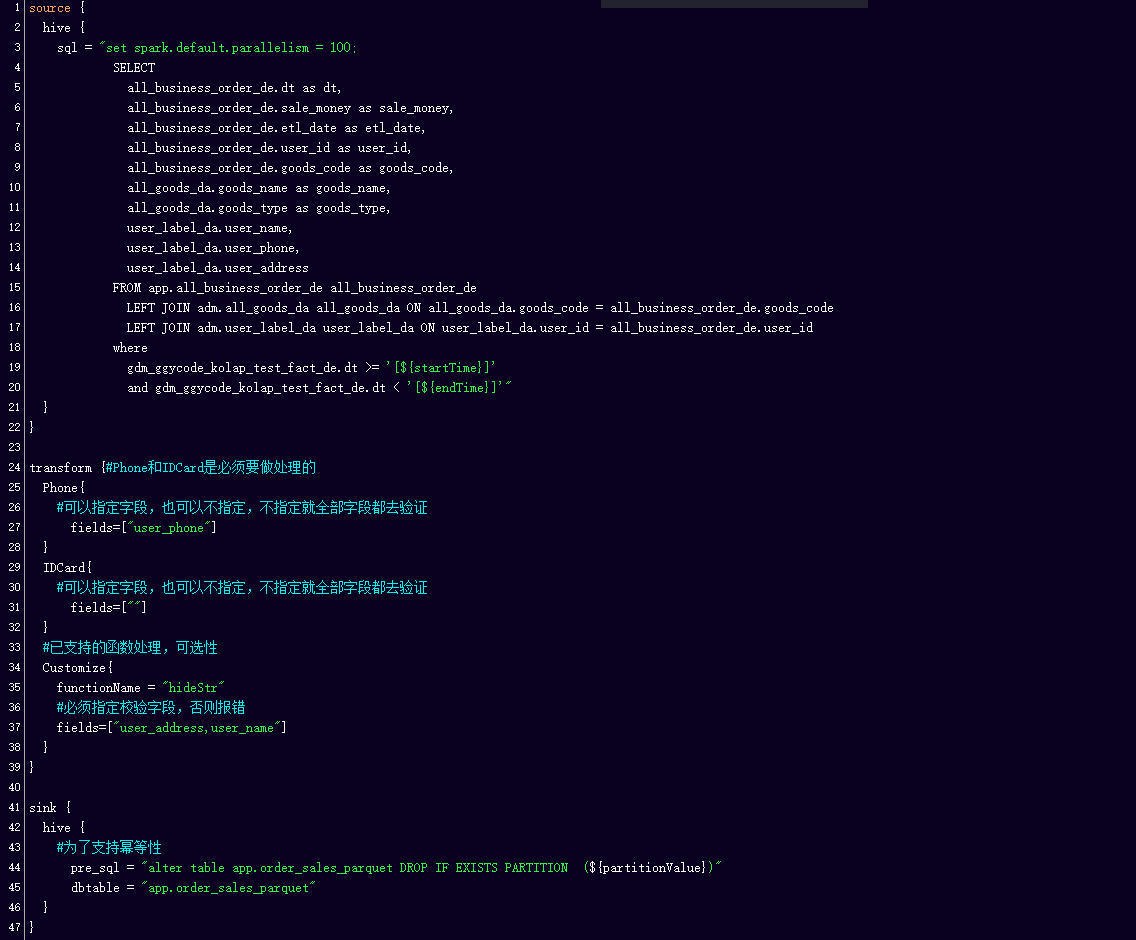
We can specify the number of Sources, Sink configuration file combinations through the configuration file The commands in the toolkit provided by SeaTunnel take the configuration file with them and when executed enable data handling.
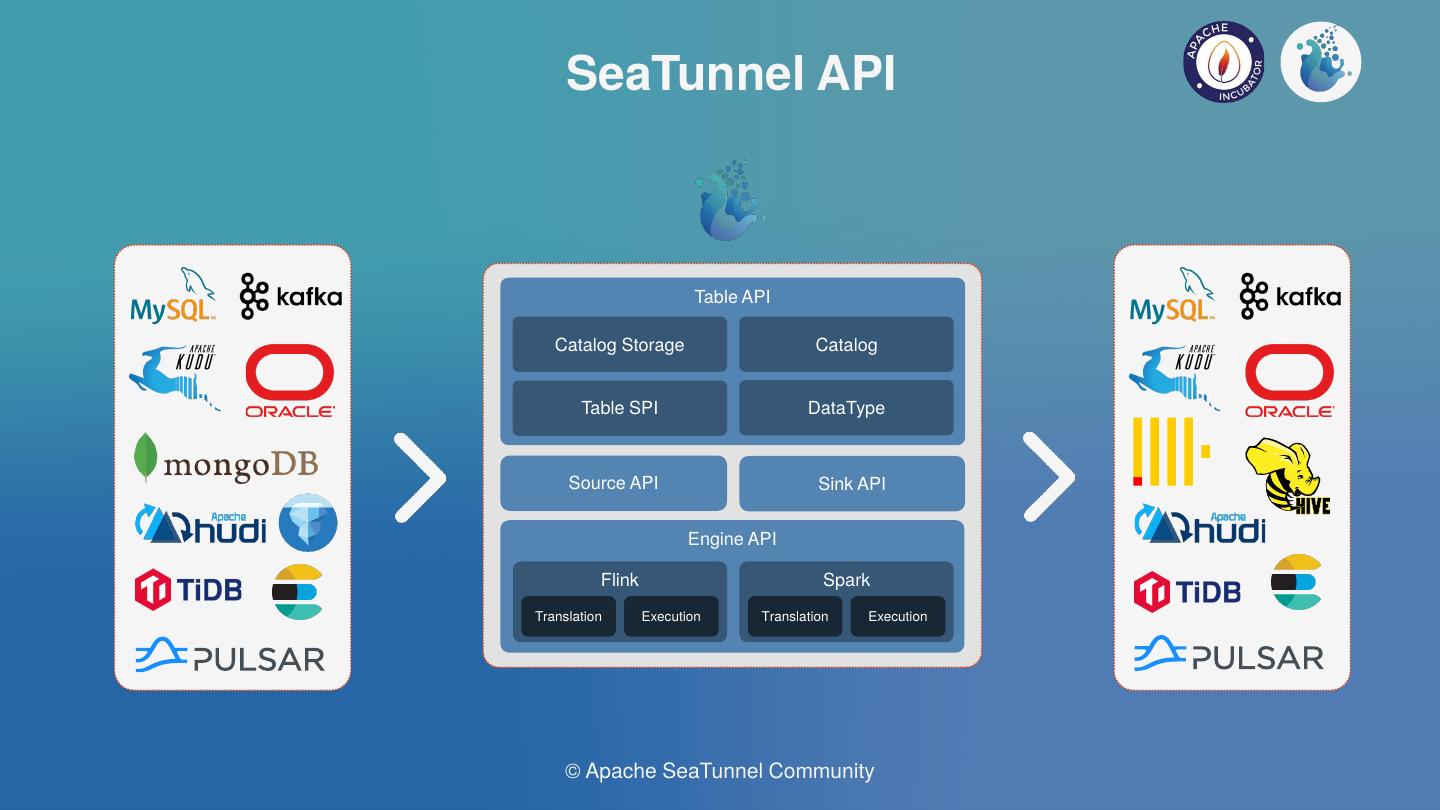
This is the Connector ecosystem that is currently supported by SeaTunnel, such as the data sources supported by JBDC, HDFS, Hive, Pulsar, message queues, etc. are currently supported.
Firstly, there are the typical usage scenarios supported by Source, such as bulk reading of devices, field projection, data type mapping, parallel reading, etc.
The BOOLEAN, INT32, INT64, etc. listed here all have corresponding SeaTunnel data types. INT32 can be mapped according to the read type on the SeaTunnel, or to TINYINT, SMALLINT, or INT when the range of values is small.
This is the corresponding example code showing how the mapping is done where the type conversion is done.
The SQL extraction of column codes allows you to extract only some of the columns you need, and when used on SeaTunnel, you can specify the name, type, etc. of the column after it is mapped to SeaTunnel via fields. The final result of the data read on SeaTunnel is shown in the figure above.

Assuming there is a table in IoTDB, we project the device column onto SeaTunnel by making it data as well through syntax. After configuring the device name column and specifying the data type, we end up reading the data on SeaTunnel in the format shown above, containing the Time, device column, and the actual data value. This makes it possible to read data from the same device in bulk.


Another typical usage scenario is to import data from other data sources into IoTDB. suppose I have an external database table with columns like ts, temperature, humidity, etc. and we import it into IoTDB, requiring the columns of temperature and humidity, but the rest can be left out. The whole configuration is shown in the diagram above, you can refer to it.
Apache SeaTunnel Committer | Zongwen Li
When SeaTunnel entered the Apache incubator, the SeaTunnel community ushered in rapid growth.
For distributed streaming processing systems, high throughput and low latency are often the most important requirements. At the same time, fault tolerance is also very important in distributed systems. For scenarios that require high correctness, the implementation of exactly once is often very important.
The previous problem will cause a long-time recovery, and the business service may accept a certain degree of data delay.
The previous examples are cases regarding a small number of tables, but in real business service development, we usually need to synchronize thousands of tables, which may be divided into databases and tables at the same time;
Besides, according to the research report of Fivetran, 60% of the company’s schema will change every month, and 30% will change every week.
If our Source or Sink is of JDBC type, since the existing engine only supports one or more links per table, when there are many tables to be synchronized, more link resources will be occupied, which will bring a great burden to the database server.
In the existing engine, a buffer and other control operators are used to control the pressure, that is, the back pressure mechanism; since the back pressure is transmitted level by level, there will be pressure delay, and at the same time, the processing of data will not be smooth enough, increasing the GC time, fault-tolerant completion time, etc.
In the data integration case, there is a possibility that a job can synchronize hundreds of sheets, and the failure of one node or one table will lead to the failure of all tables, which is too costly.
For example, if the Source fails, the Sink does not need to restart. In the case of a single Source and multiple Sinks, if a single Sink fails, only the Sink and Source that failed will be restored; that is, only the node that failed and its upstream nodes will be restored.
For sink failure, when data cannot be written, a possible solution is to work two jobs at the same time.
Schema Evolution is a feature that allows users to easily change the current schema of a table to accommodate changing data over time. Most commonly, it is used when performing an append or overwrite operation, to automatically adjust the schema to include one or more new columns.
The Multi-table feature can reduce the use of some Source and Sink link resources. At the same time, we have implemented Dynamic Thread Resource Sharing in SeaTunnel Engine, reducing the resource usage of the engine on the server.
As for the problems that cannot be solved by the back pressure mechanism, we will optimize the Buffer and Checkpoint mechanism:
Bo Bi, data engineer at Mafengwo
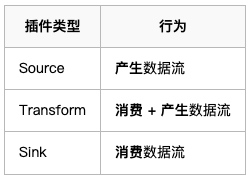
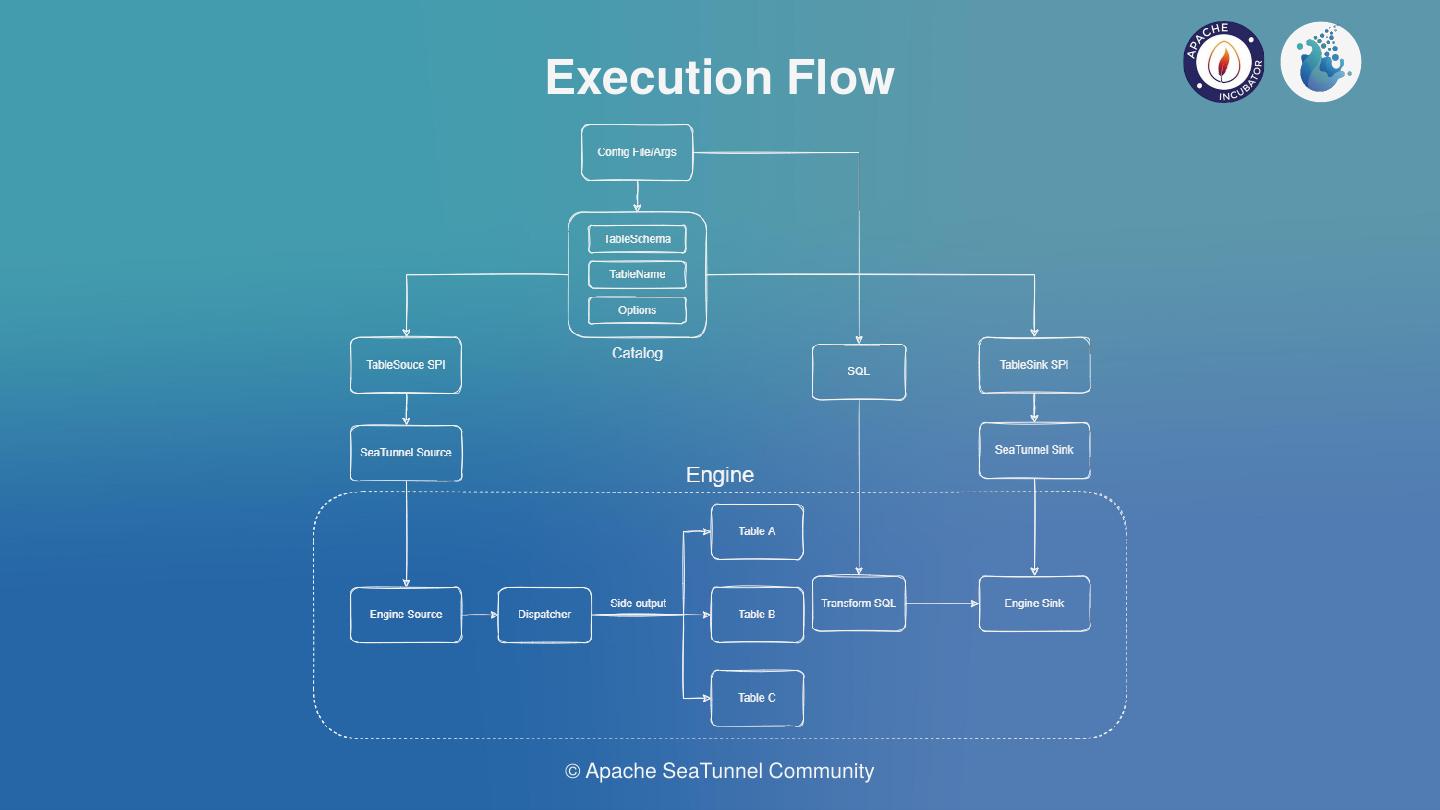
This shows that the core of SeaTunnel is the Source, Transform and Sink process definitions.
The above diagram shows the definition of the interface, the Plugin interface in SeaTunnel abstracts the various actions of data processing into a Plugin.
Execution, the data flow builder used to build the entire data flow based on the first three, is also part of the base API


SeaTunnel’s API consists of three main parts.
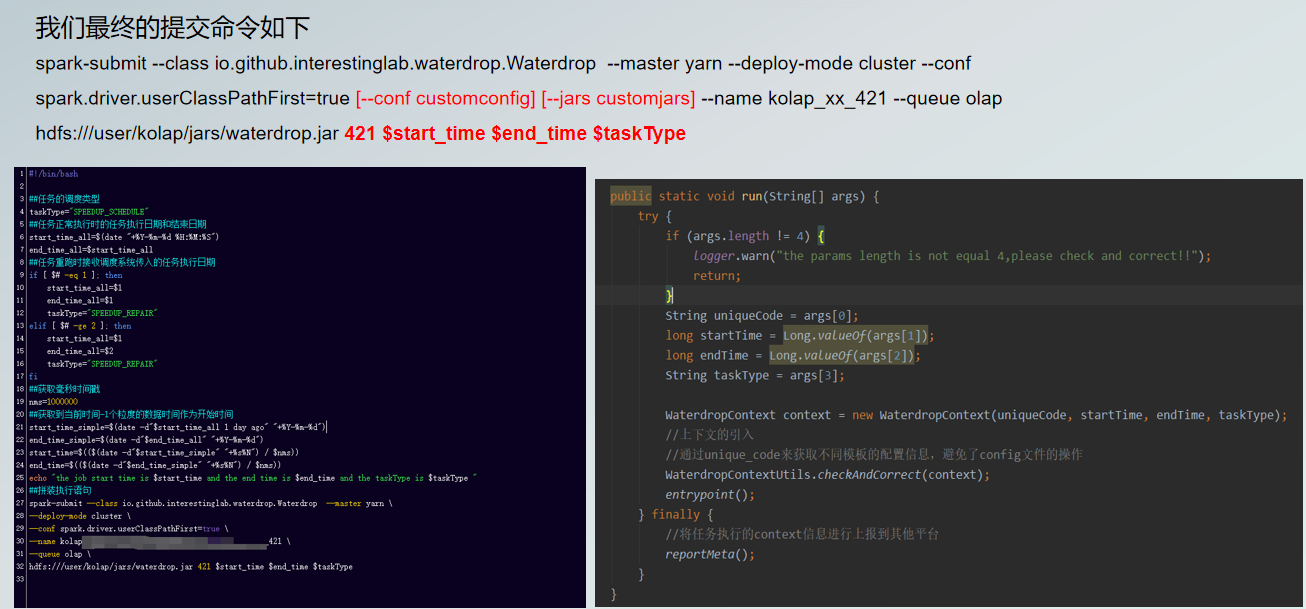
Then find the Connector path from the Connector plugin directory and stitch it into the Spark-submit launch command with — jar, so that the found Plugin jar package can be passed to the Spark cluster as a dependency.
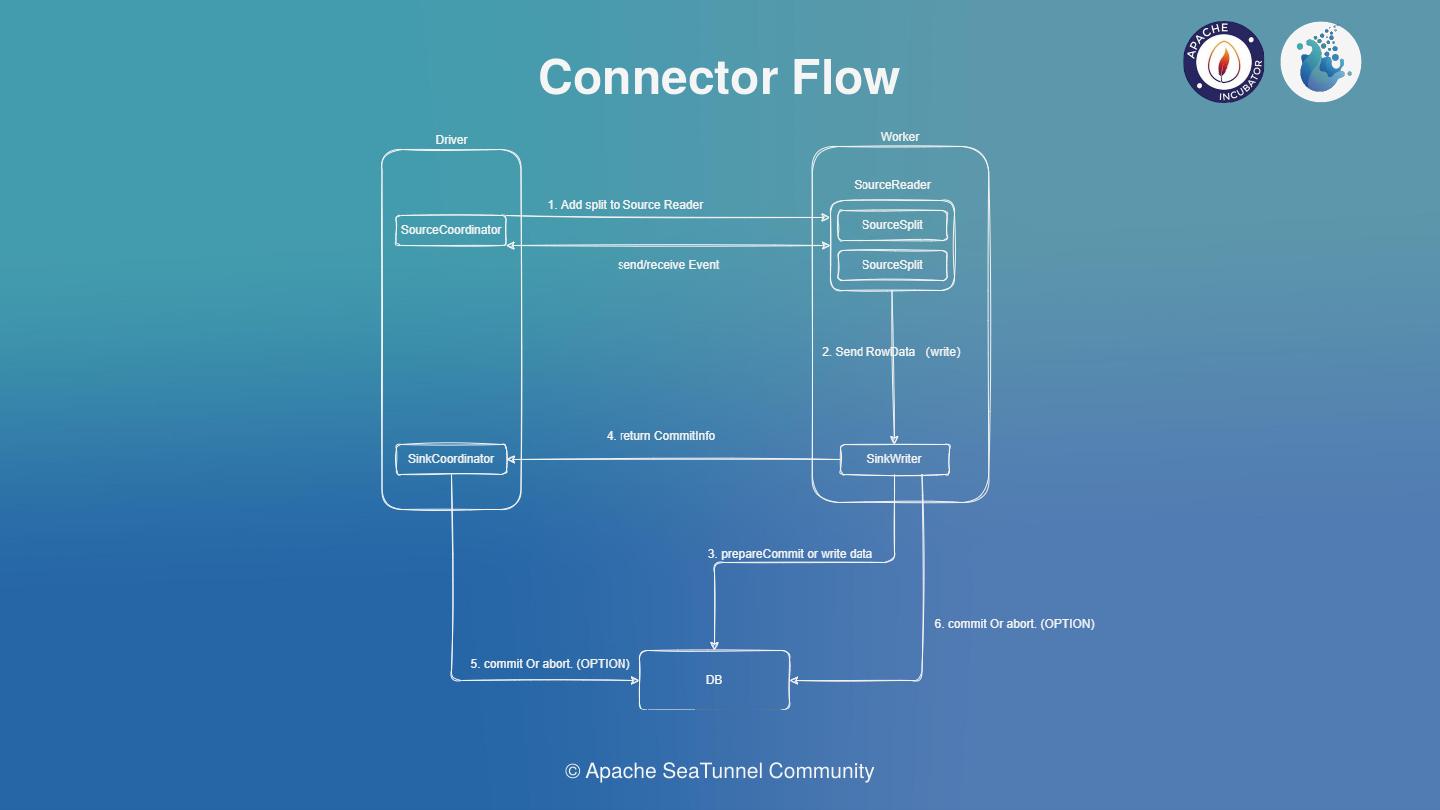
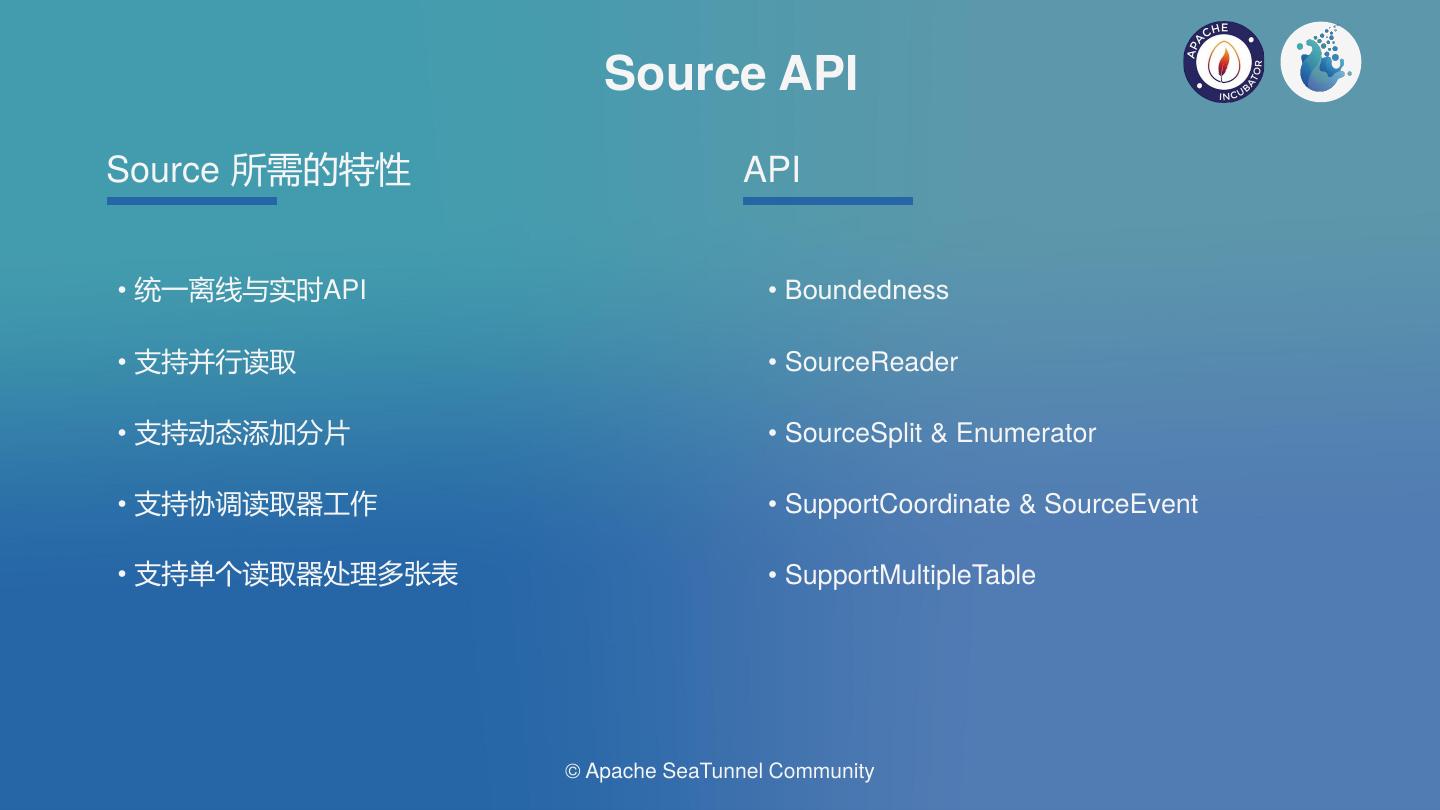
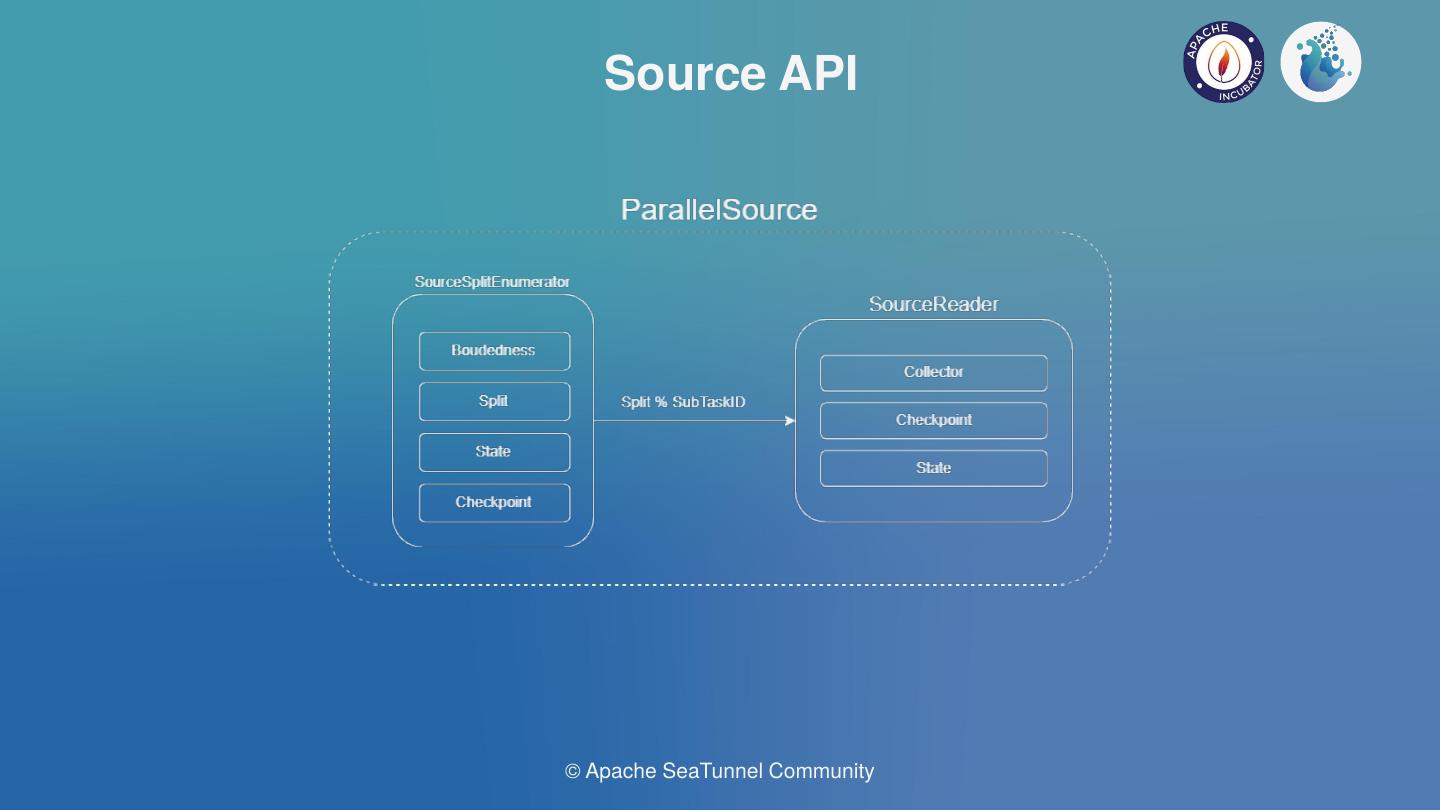
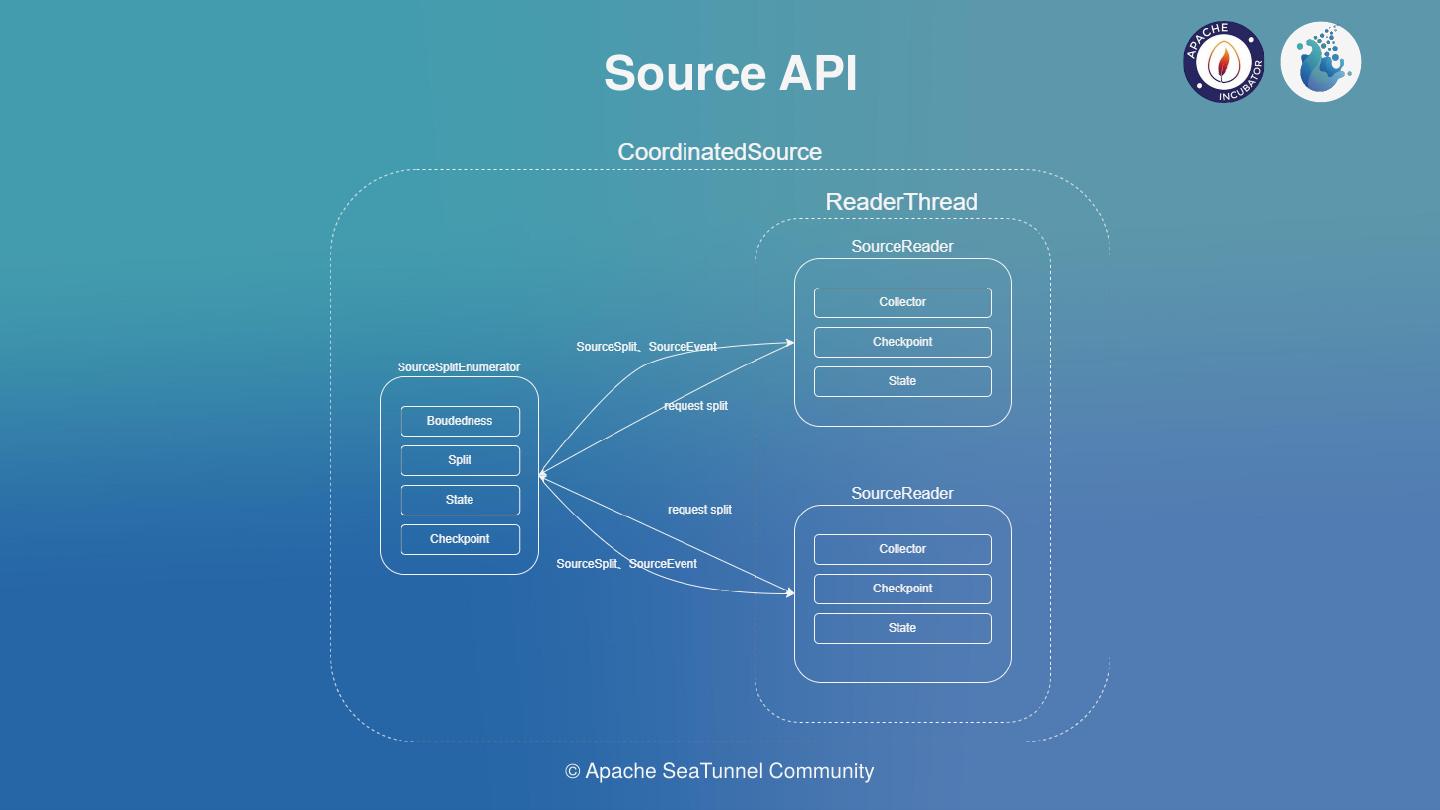
The core Source API interaction flow is shown above. In the case of concurrent reads, the enumerator SourceSplitEnumerator is required to split the task and send the SourceSplit down to the SourceReader, which receives the split and uses it to read the external data source.
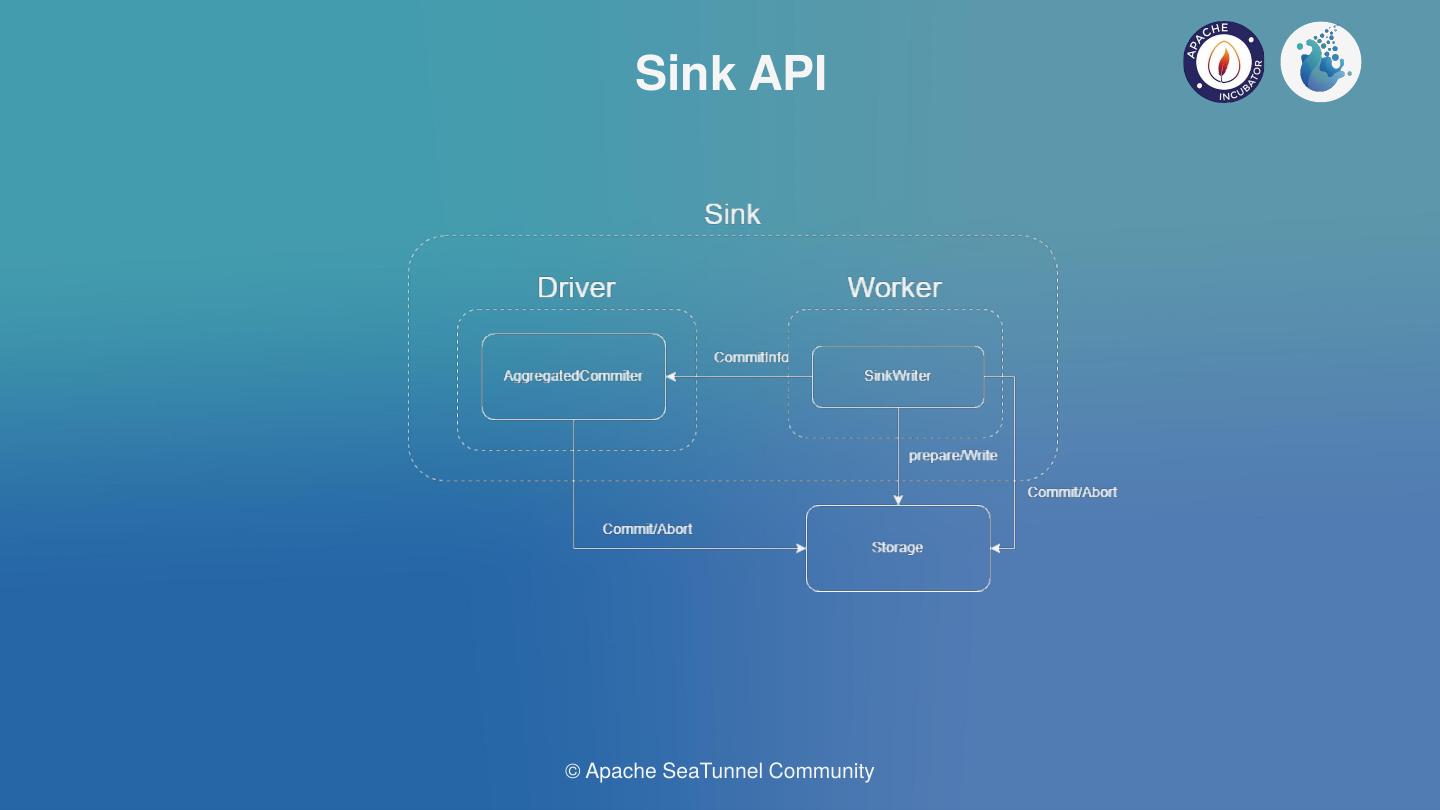
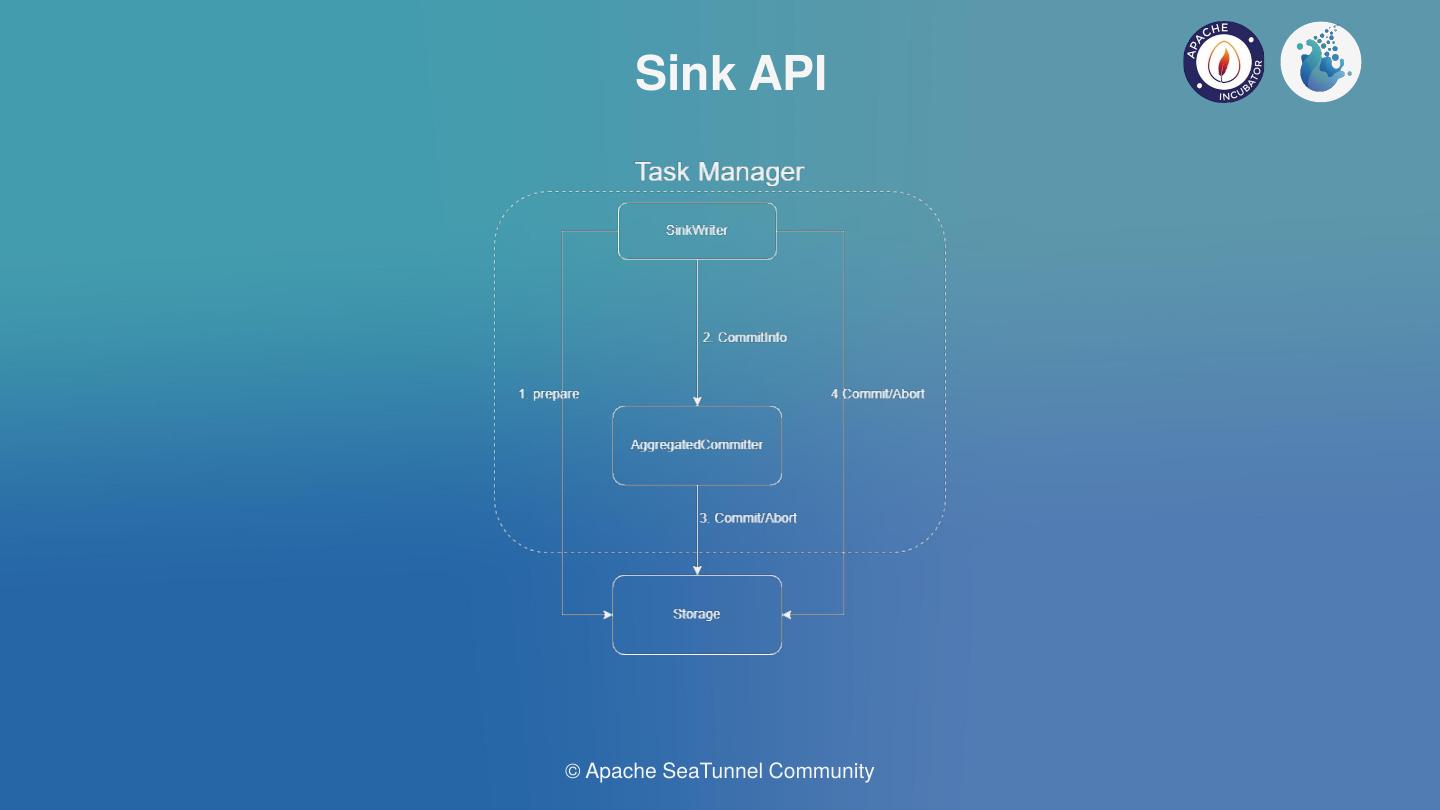
The overall Sink API interaction flow is shown in the diagram below. The SeaTunnel sink is currently designed to support distributed transactions, based on a two-stage transaction commit.
For the Kafka sink connector implementation, the first stage is to do a pre-commit by calling KafkaProducerSender.prepareCommit().
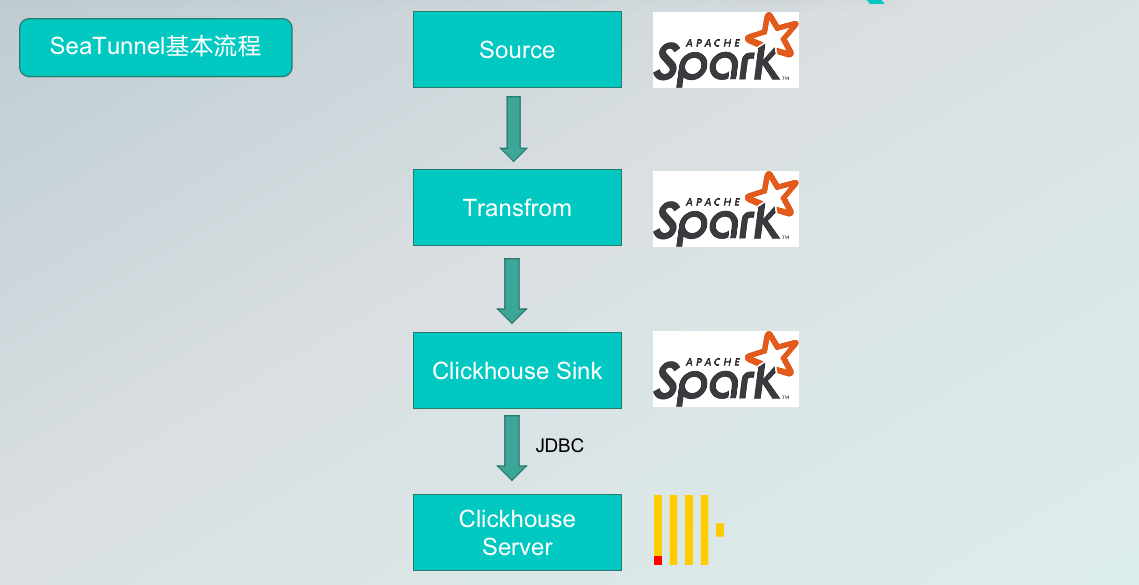
SeaTunnel V2: Thanks to the work of the engine translator, the Connector API, and the SeaTunnelRow, the data source of the SeaTunnel internal data structures accessed through the Connector, are translated by the translation layer into a runnable Spark API and spark dataset that is recognized inside the engine during data transformation.
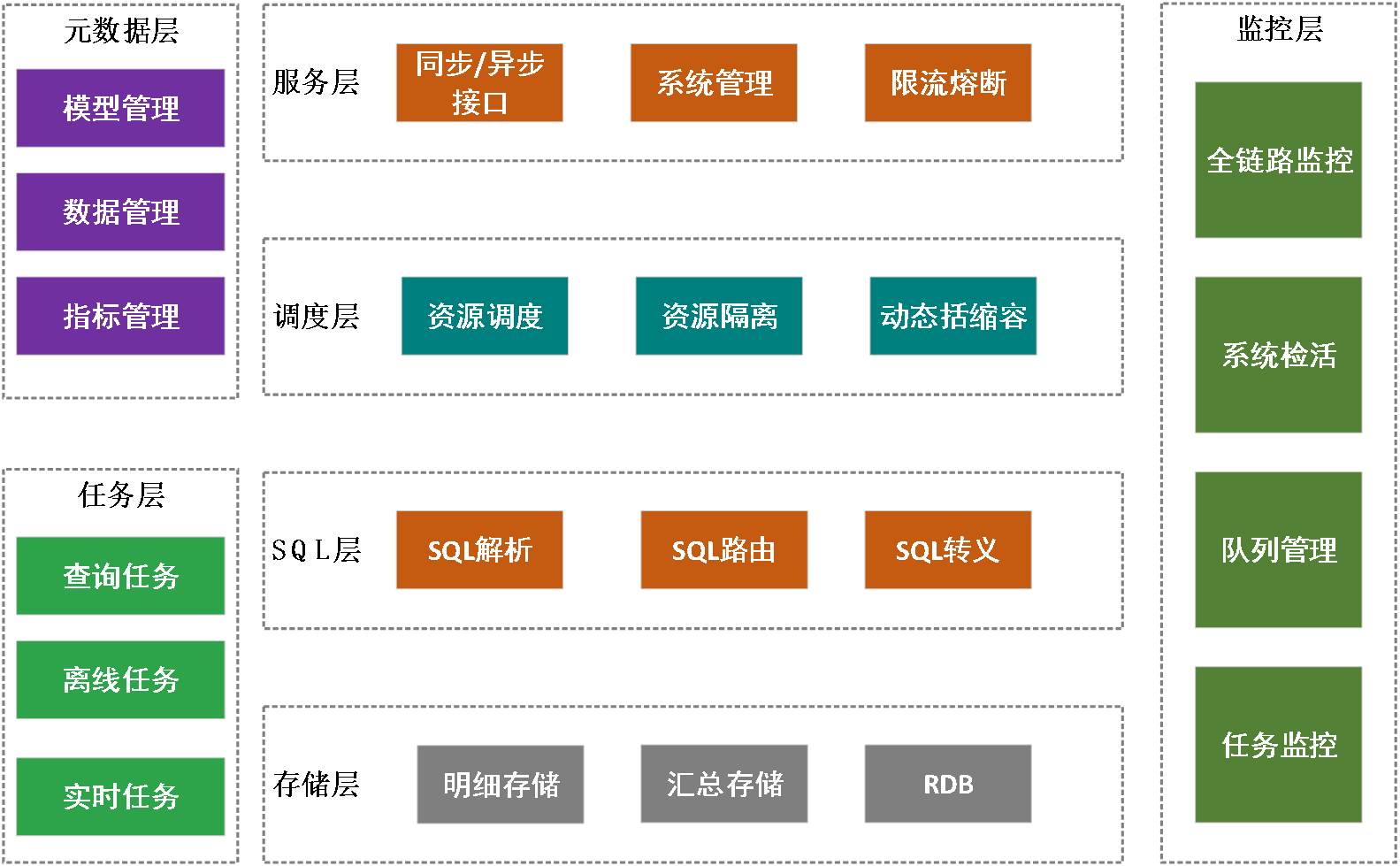
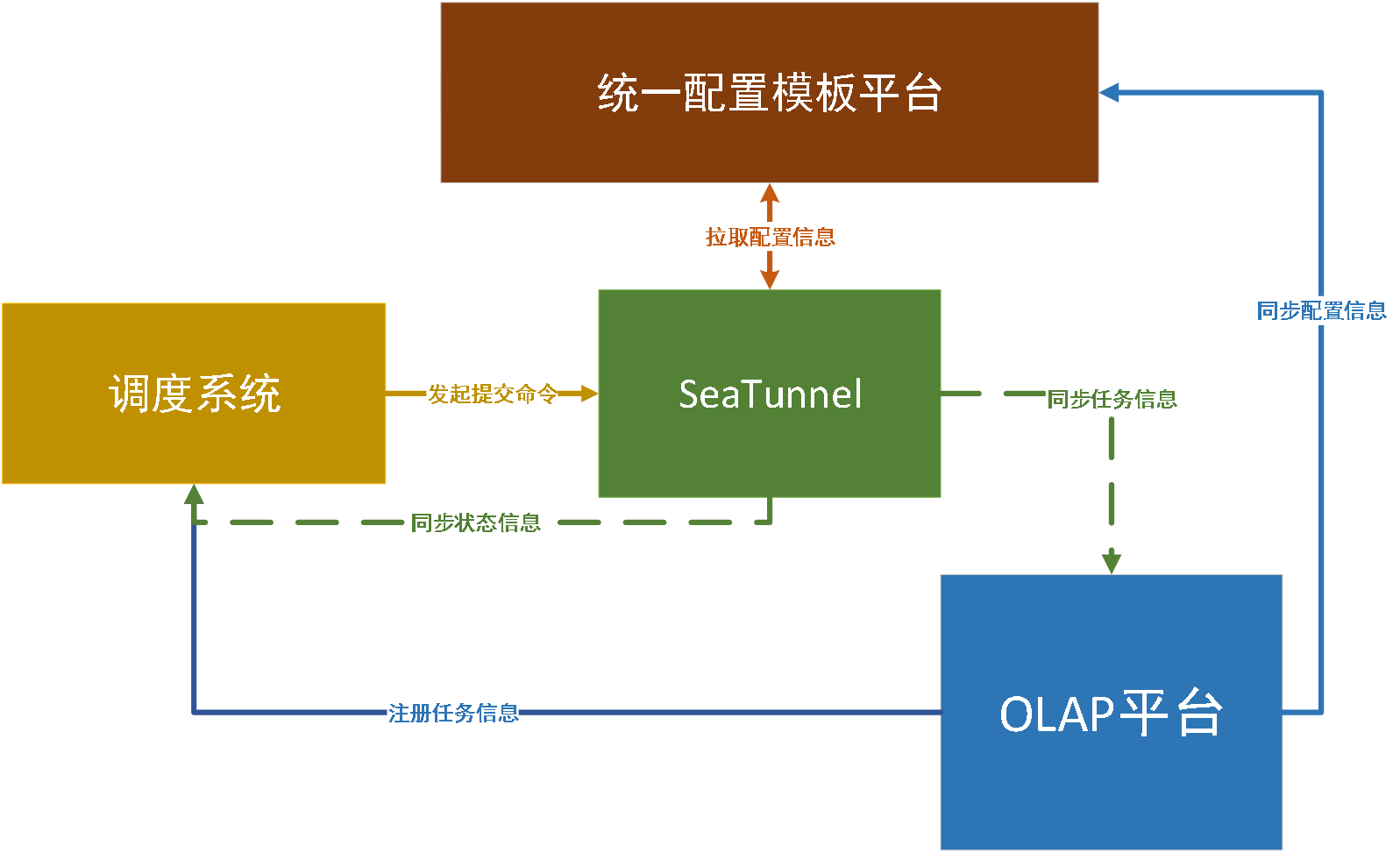
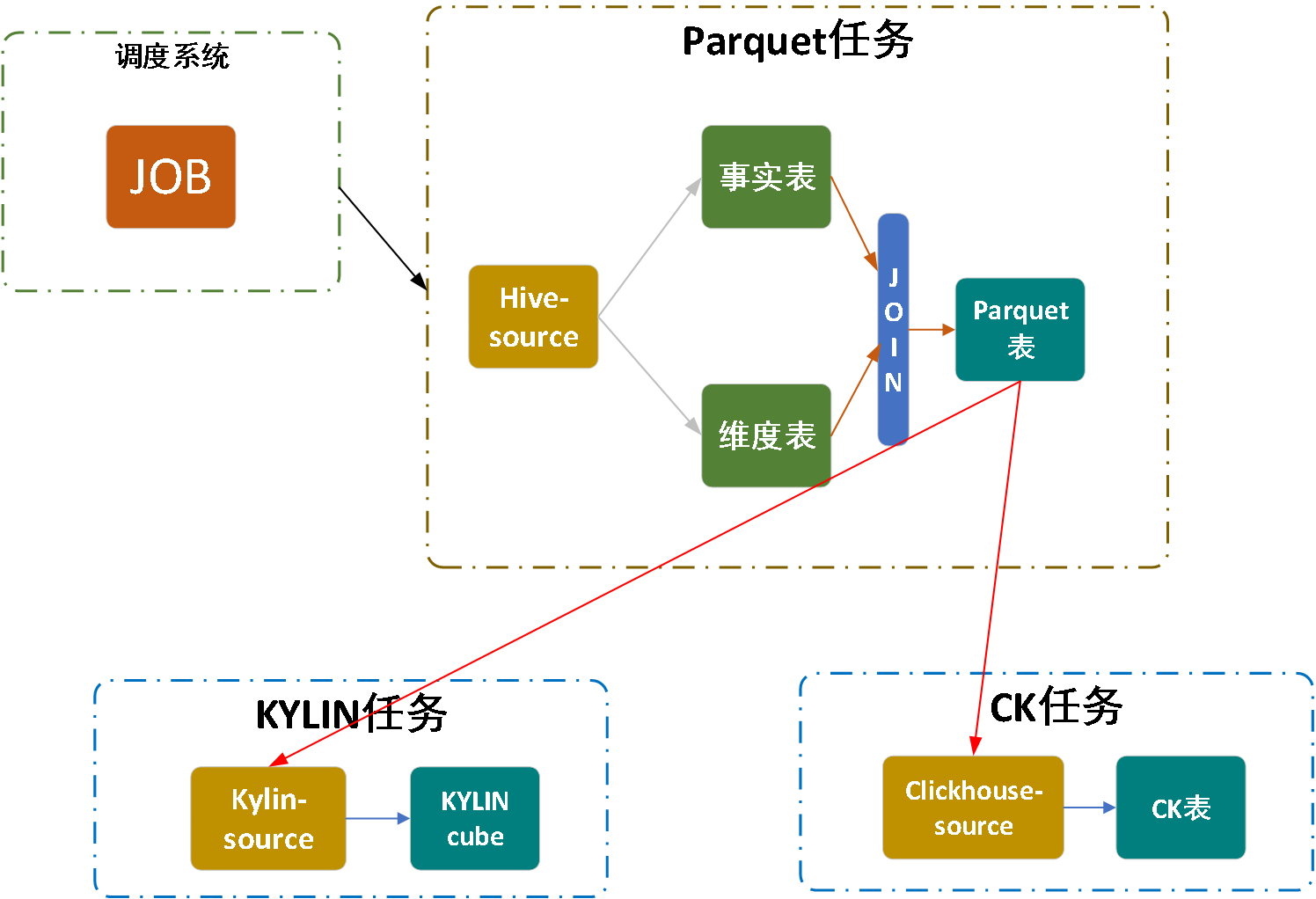
Hornet’s Nest Big Data Development Platform, which focuses on providing one-stop big data development and scheduling services, helps businesses solve complex problems such as data development management, task scheduling and task monitoring in offline scenarios.
The Hornet’s Nest Big Data Development and Scheduling Platform consists of four main modules: the task component layer, the scheduling layer, the service layer, and the monitoring layer.
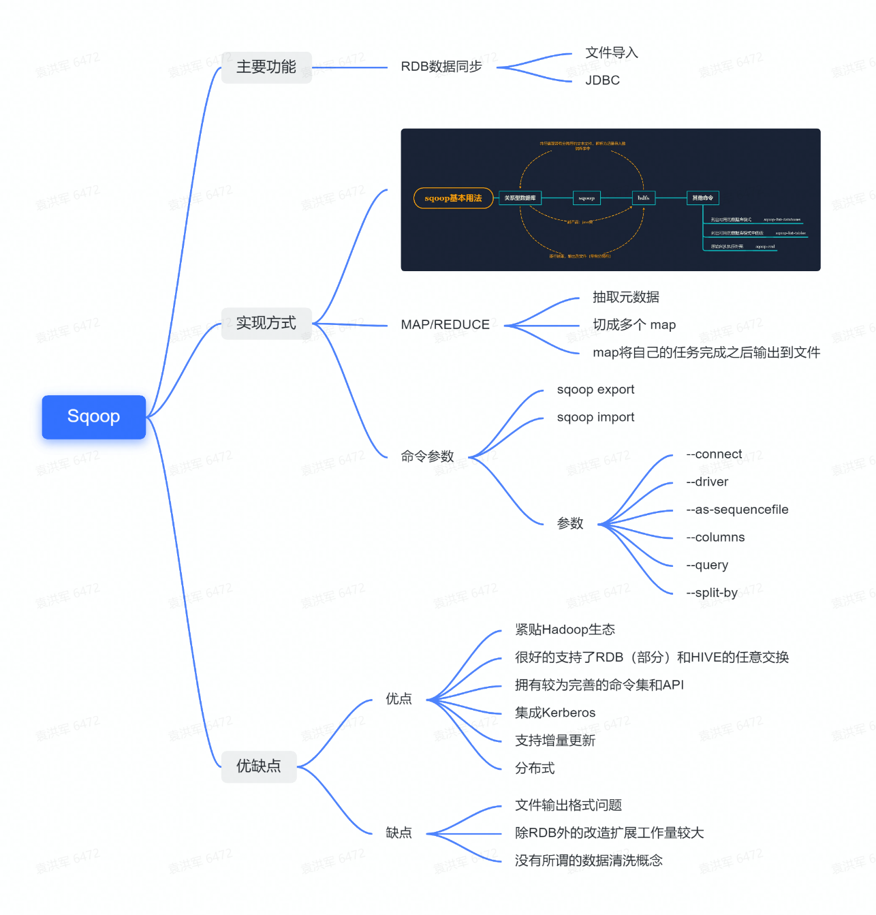
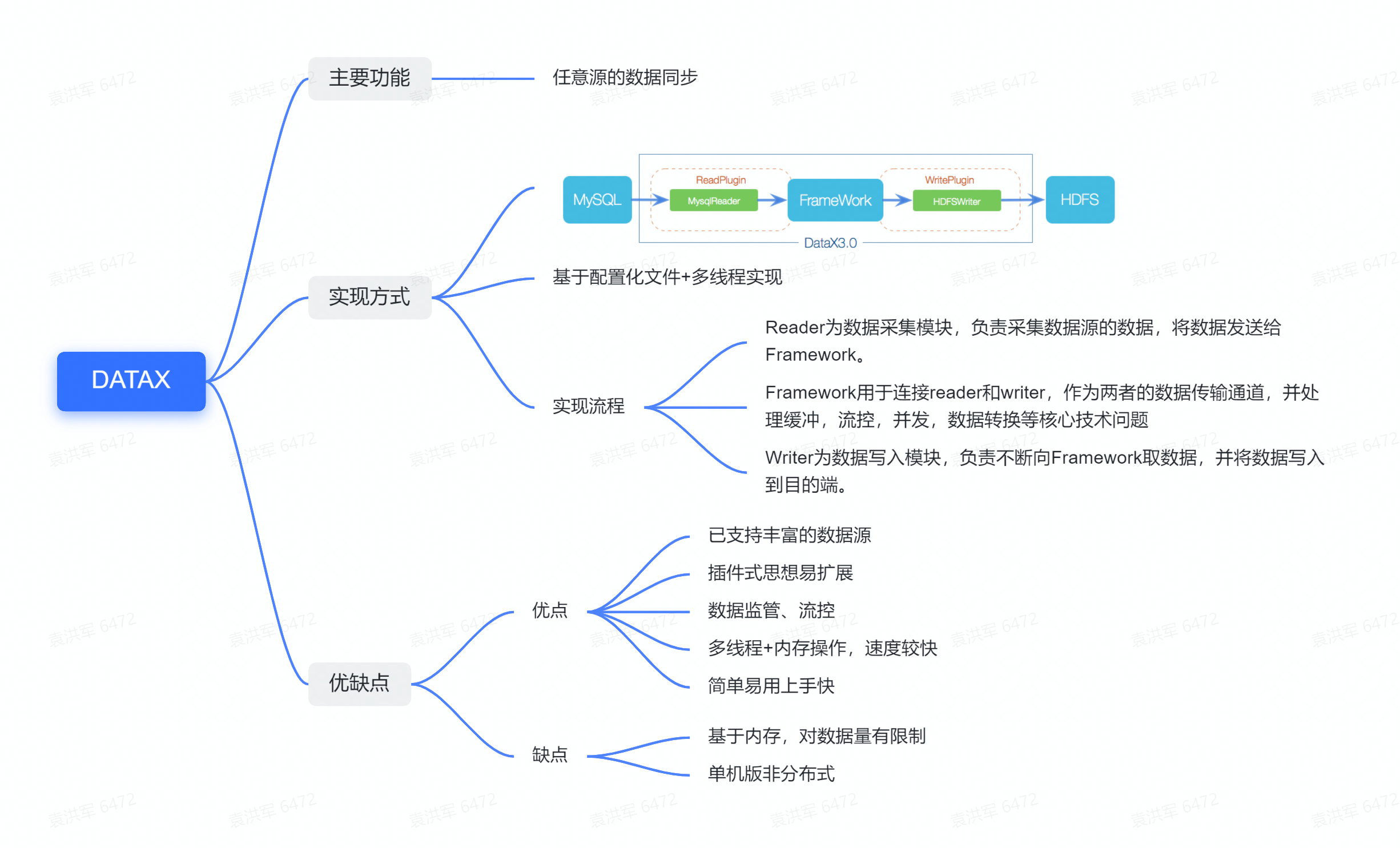
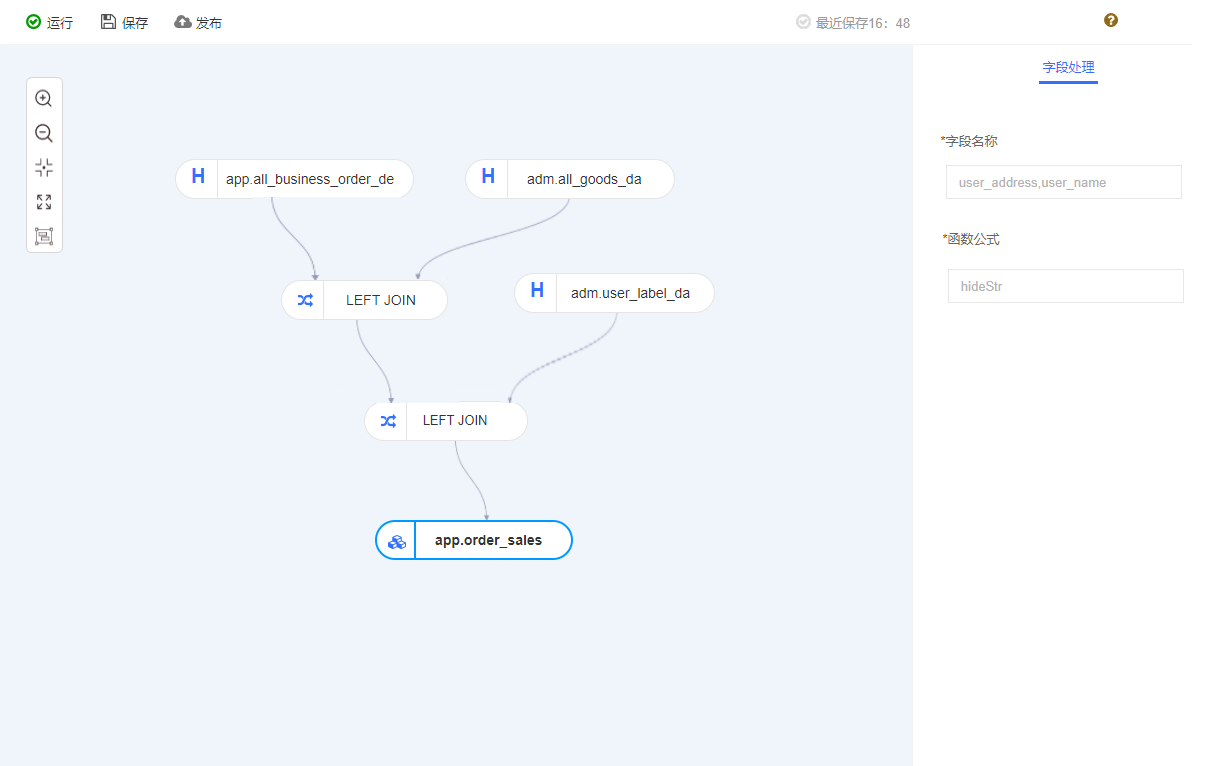
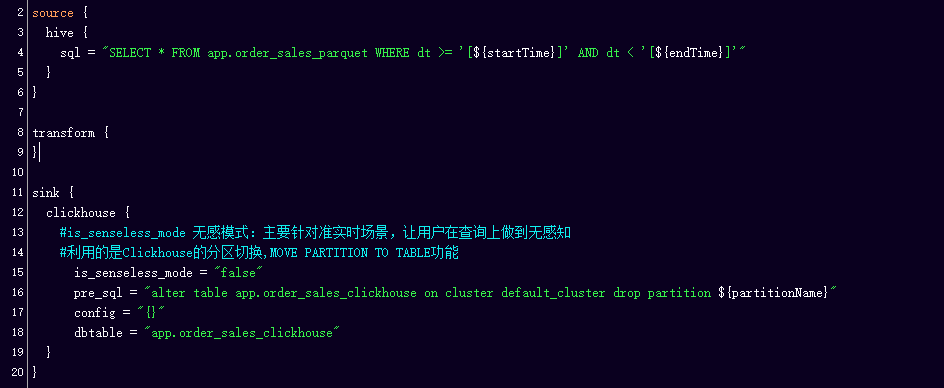
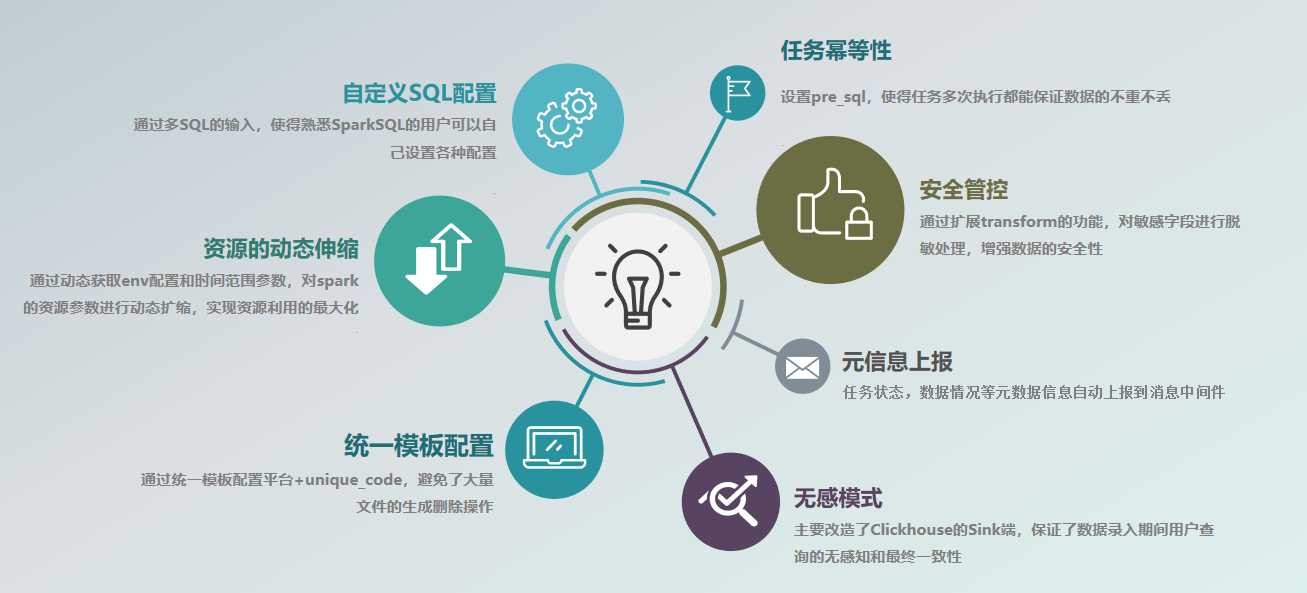
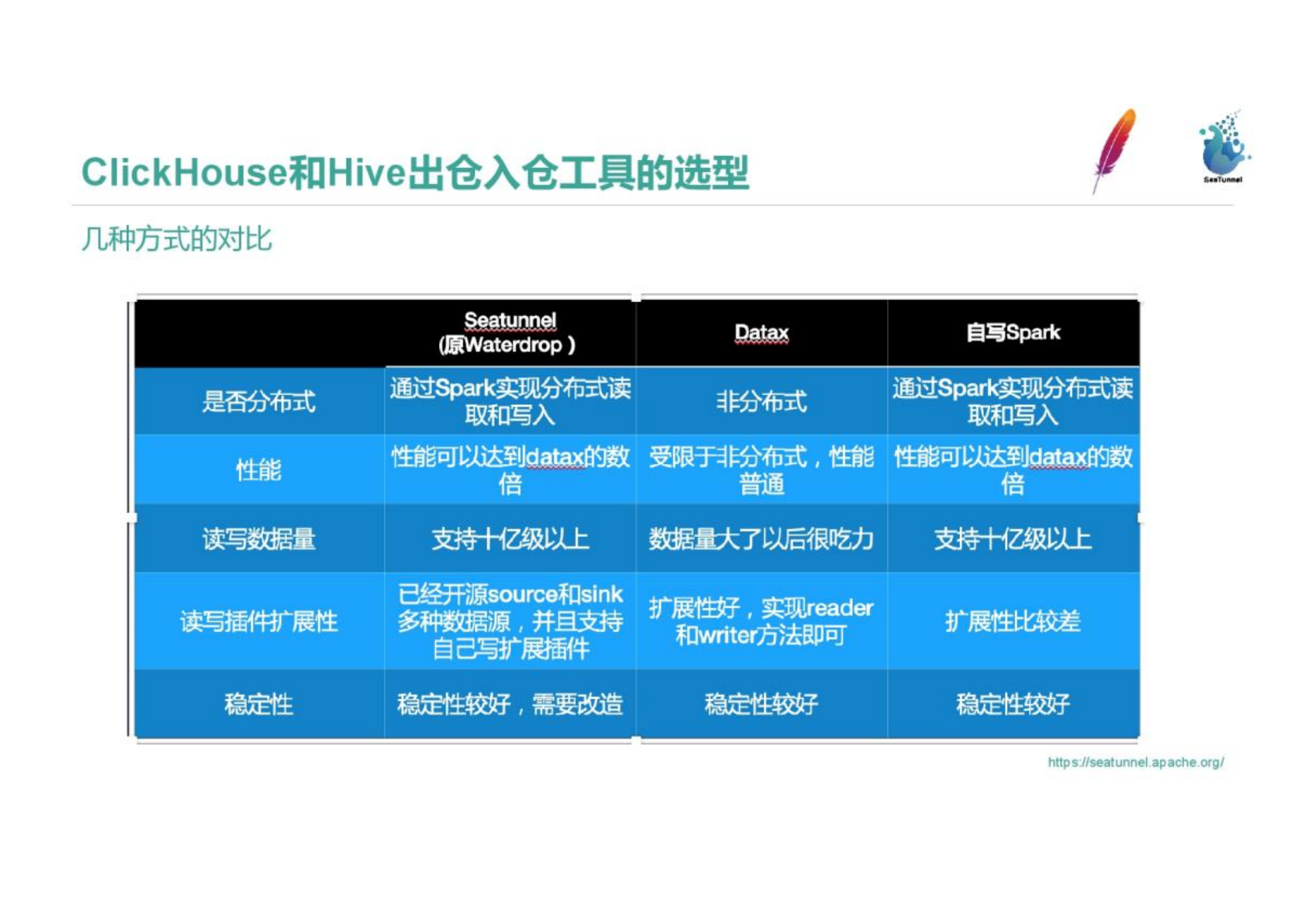
To address the pain points mentioned above, we actively explored solutions and conducted a selection analysis of several mainstream data integration products in the industry. As you can see from the comparison above, Datax and SeaTunnel both offer good scalability, and high stability, support rich connector plugins, provide scripted, uniformly configurable usage, and have active communities.
StarRocks currently also supports Spark Load, based on the Spark bulk data import method, but our ETL is more complex, needs to support data conversion multi-table Join, data aggregation operations, etc., so temporarily can not meet.
We’ll divide it into four key parts:


In fact, the implementations of Connectors like Feishu, DingTalk, and Facebook messenger are quite simple as the connectors do not need to carry a large amount of data (just a simple Source and Sink). This is in sharp contrast to Hive and other databases that need to consider transaction consistency or concurrency issues.